Kagi Search has shipped a pair of useful updates in its August 21, 2026 changelog. The ad-free, privacy-focused search engine has completely overhauled its Stocks widget adding price charts, animated time-window transitions, and support for ETFs and introduced a new setting that removes paywalled websites from search results entirely, without any extra steps from the user.
A Fully Rebuilt Stocks Widget
The previous Stocks widget in Kagi was functional but limited it could pull up basic price data for individual stocks but triggered inconsistently and offered no visual context. The redesigned widget addresses all three of those weaknesses at once.
Most visibly, the new widget now includes an interactive price chart with selectable time windows 1 day, 5 days, 1 month, 3 months, 1 year, 5 years, and a max view matching what users typically get from dedicated financial data tools. Switching between time windows triggers a smooth animation that helps put any current fluctuation in context: a 2% daily move looks very different against a 3-month chart versus a 5-year one.

The widget also now shows standard market data fields alongside the chart: open price, daily volume, intraday high and low, and 52-week high and low. In the example above, Kagi displays the Vanguard Total World Stock ETF (VT) at $160.70 with a 3-month chart and full stats visible without having to leave the search results page.
The other significant addition is ETF support. Previously the widget was scoped to individual stocks, which meant searches for index funds and ETFs a very common category of query for everyday investors would not reliably trigger it. That gap is now closed.
Kagi also says the widget will now appear more consistently when a financial query warrants it, addressing a long-standing complaint from users who found it triggered sporadically for legitimate stock searches.
A New Setting: Exclude Paywalled Websites
The second notable addition from the same changelog entry is a new toggle in Kagi's search settings Exclude paywalled websites which, when enabled, automatically removes results from websites known to lock content behind a paywall.
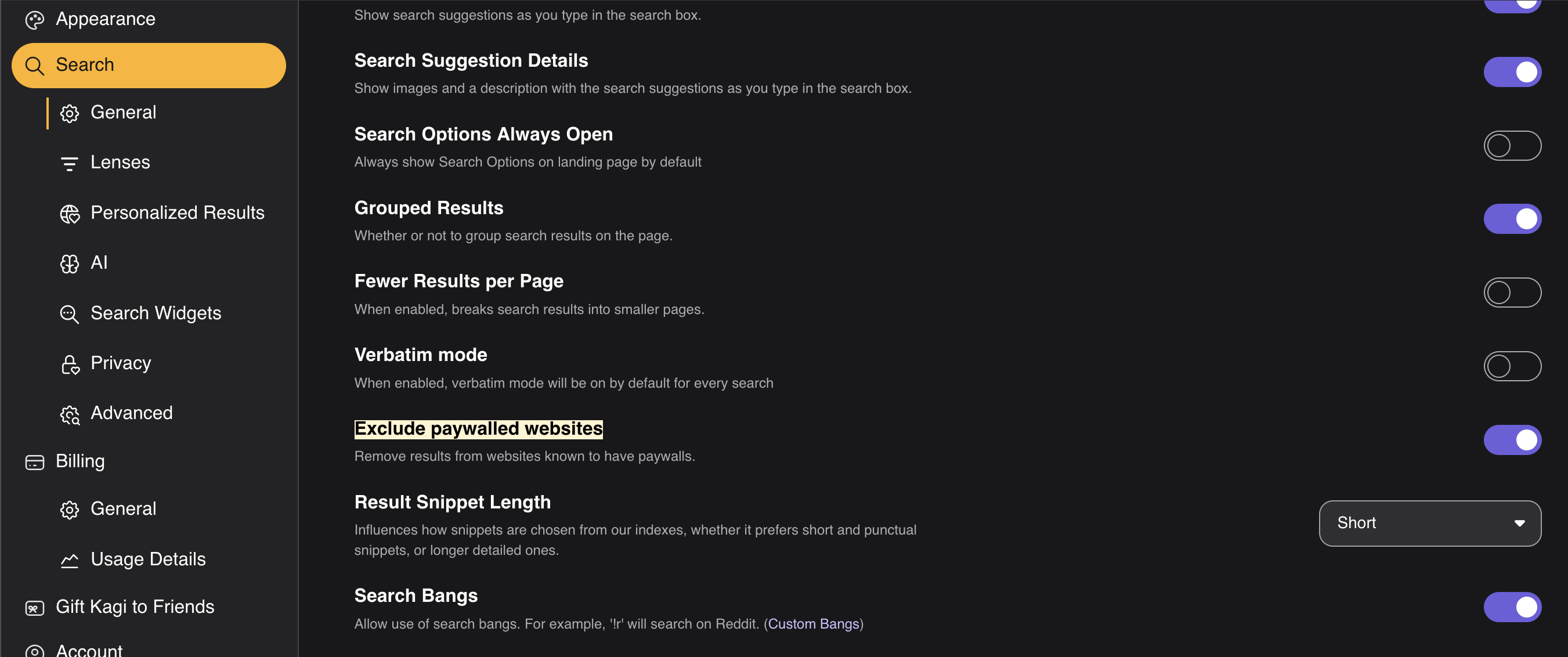
The option sits in the Search → General settings panel alongside other result-quality controls like Verbatim mode and Grouped Results. It is off by default and requires opting in, but once enabled it applies globally to all searches without any further action from the user.
For privacy-focused users this is a practical quality-of-life feature. Clicking a search result only to land on a paywall prompt is a frustrating dead end, and no other major search engine offers a built-in option to filter these sites out automatically. The addition is a good example of what a subscription-funded search engine can prioritize when it does not need to maintain relationships with publishers for advertising revenue.
Where to Find the Updates
Both changes are live as of August 21, 2026. The Stocks widget update applies automatically when searching for stocks or ETFs. The paywall exclusion setting can be found at kagi.com/settings/search under the General section, or by visiting Kagi's official changelog entry for the full description of what changed.
Sources
- Kagi Search Changelog August 21, 2026: kagi.com
- Exclude paywalled websites setting: kagi.com/settings/search
This article was written by DigitalEscapeTools based on Kagi's official changelog and publicly available information at the time of publication.